My terminal now tells me when I'll finish my book (and UTC midnight tried to stop it)
I read most evenings and track it on Hardcover. I also live in a terminal, so a while ago I built oku, a keyboard-driven dashboard and CLI for a Hardcover library, written in Go with Bubble Tea.
Version 0.16 is out this week. The headline feature answers the question I actually ask while I’m reading: when am I going to finish this?
Pace forecasting
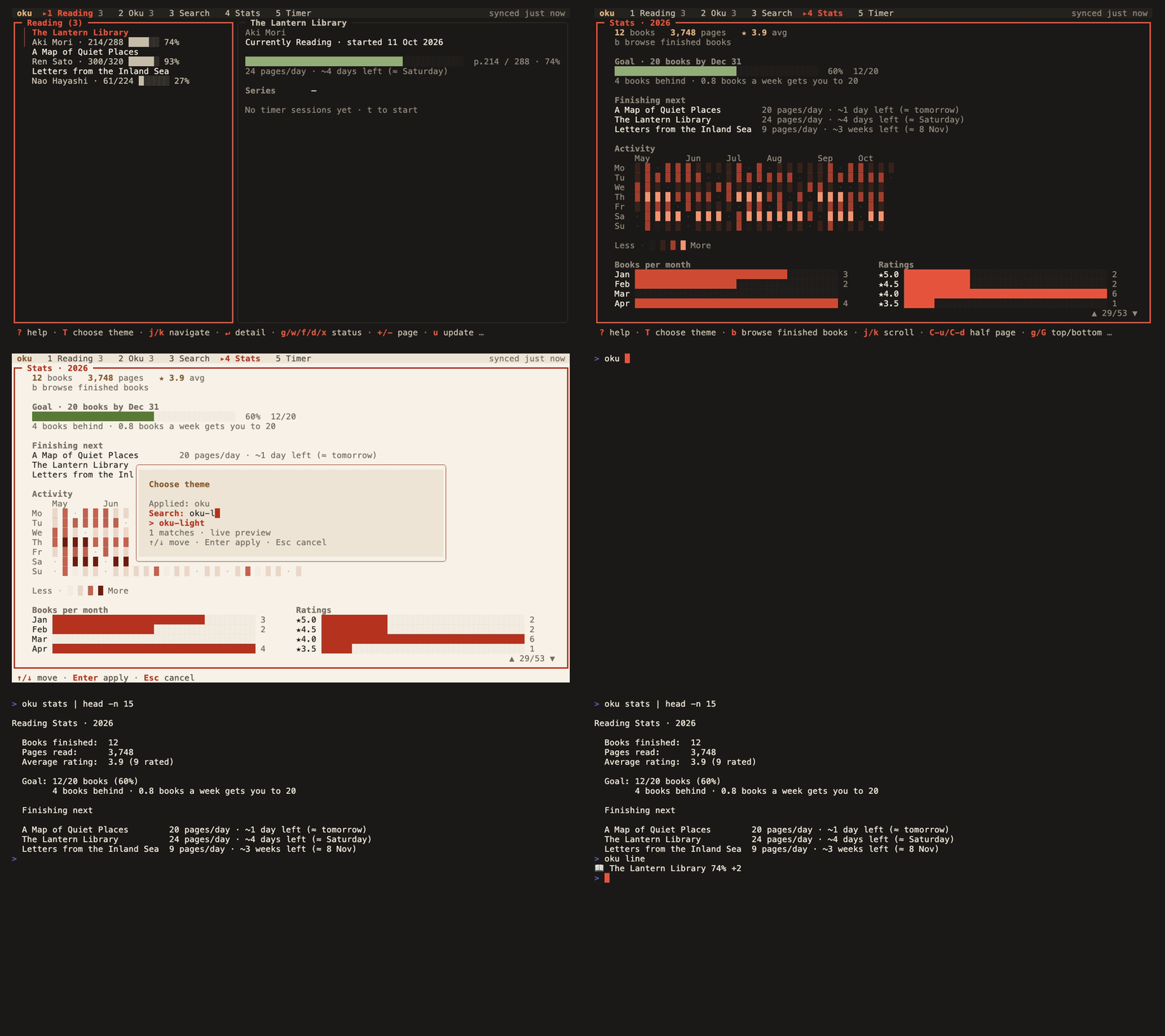
Each book you’re reading now gets an estimate based on the pace you’ve kept since you started it:
The Lantern Library    24 pages/day · ~4 days left (≈ Saturday)
A Map of Quiet Places  20 pages/day · ~1 day left (≈ tomorrow)
Your yearly goal gets the same treatment. Instead of a bare 12/20, it tells you where you stand and what it takes from here:
Goal: 12/20 books (60%)
      4 books behind · 0.8 books a week gets you to 20
It’s in the dashboard’s Stats tab, in each book’s preview, and in oku stats. oku stats --json includes it too, so you can pipe it into anything.
The arithmetic is simple, on purpose
Pace is pages read divided by the days since the read started. Days left is the remaining pages divided by that pace, rounded up. The goal is measured against an even pace through its window: by day 292 of 365, a 20-book goal “expects” 16 books.
Most of the work went into deciding when not to estimate:
- A book started today has no pace yet, so it says
started todayrather than extrapolating from one evening. - A stalled read (under half a page a day) says so instead of promising a date in 2029.
- Anything more than two years out isn’t shown. It isn’t an estimate anyone can plan around.
- The goal’s projection waits a week. Finish one book on 2 January and a naive projection says you’re “on pace for 365”.
- The weekly rate is rounded up, so following the advice never leaves you a fraction of a book short.
Dates are worded the way you’d say them: tomorrow, then the weekday while it’s still this week, then the date.
The bug: UTC midnight is yesterday in New York
Hardcover stores a read’s start date and a goal’s dates as bare dates: 2026-10-20, no time, no zone. Go parses that as midnight UTC. My first version then converted it to local time before counting days, which is the “obvious” thing to do.
In New York, midnight UTC on the 20th is 7 p.m. on the 19th. So every read west of Greenwich looked a day older than it was. A book you started this morning had a pace already, just a wrong one. A goal ending on 31 December “expired” at 7 p.m. that evening, and oku quietly switched to next year’s goal.
The fix was to stop treating these values as instants. A bare date means that calendar day, wherever you are, so the day count compares each value’s own year/month/day and never converts it:
// DaysBetween counts calendar days from a's date to b's, each read in its
// own zone. Hardcover's bare dates parse as UTC midnight and mean that day
// wherever the reader is, so they must not be converted.
func DaysBetween(a, b time.Time) int {
	da := time.Date(a.Year(), a.Month(), a.Day(), 0, 0, 0, 0, time.UTC)
	db := time.Date(b.Year(), b.Month(), b.Day(), 0, 0, 0, 0, time.UTC)
	return int(db.Sub(da).Hours() / 24)
}
The same bug ran the other way when writing: new reads were dated with time.Now().UTC(), so a book started at 00:30 in Tokyo was recorded as started the day before. That’s fixed too, and the tests now run the forecasts under New York, Tokyo and Auckland time.
If you store dates without times anywhere, it’s worth checking for this.
A house theme
oku already shipped Nord, Dracula, Gruvbox, Solarized, Catppuccin and Tokyo Night. v0.16 adds its own pair, oku and oku-light, built from the project’s mascot: an origami page with one vermilion fold.
The dark theme is sumi ink with washi-ivory text. The light one is the same palette on paper. The activity heatmap climbs from the ink into the vermilion, so a busy reading week glows. Every palette in oku is held to WCAG contrast floors by a test, and these two pass with room to spare.
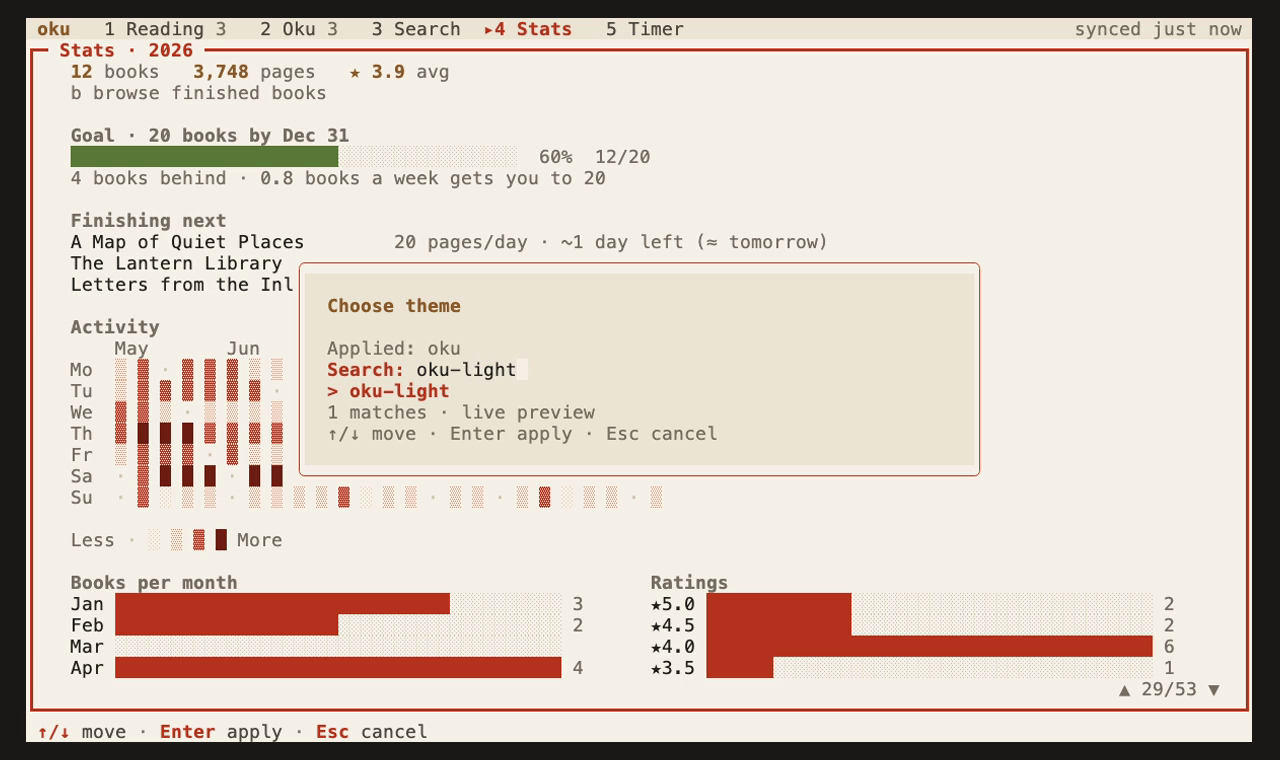
Press T in the dashboard to preview themes live, or run oku config theme oku.
Your book in your prompt
oku line prints the book you’re reading as one line, for Starship, tmux or any status bar:
$ oku line
📖 The Lantern Library 74% +2
It reads only the local cache, so it takes about 10 ms. When nothing is in progress it prints nothing, so the segment disappears:
# ~/.config/starship.toml
[custom.oku]
command = "oku line"
when = "command -v oku"
style = "bold red"
Try it
brew tap Kameleon21/oku
brew install --cask oku
On Linux or Windows, grab a binary from Releases, or run go install github.com/Kameleon21/oku/cmd/oku@latest. You’ll need a Hardcover account.
The code is on GitHub at Kameleon21/oku, MIT-licensed.
Next on my list is connecting the reading timer to page progress, so the pace can use time actually spent reading instead of calendar days. If you try oku, I’d love to hear what you’d want it to forecast next.